
WordPress Toolkit is a feature-rich management interface that allows anyone to install, update, configure, clone and manage WordPress websites.
Before doing any updates it is strongly recommended to back up your website using the Plesk Backup and Restore tool. Follow this link to the knowledgebase article explaining how to do so.
Follow these steps to log into your hosting control panel.
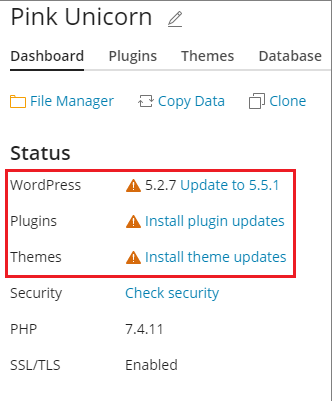
8. Click any message about available updates, wait for WP Toolkit to load the list of available updates, and then select the updates you want to install
Note: If an update of a WordPress core is available, you will see the Restore Point checkbox. Keep this checkbox selected to create a restore point you can use to roll back the update if something goes wrong.
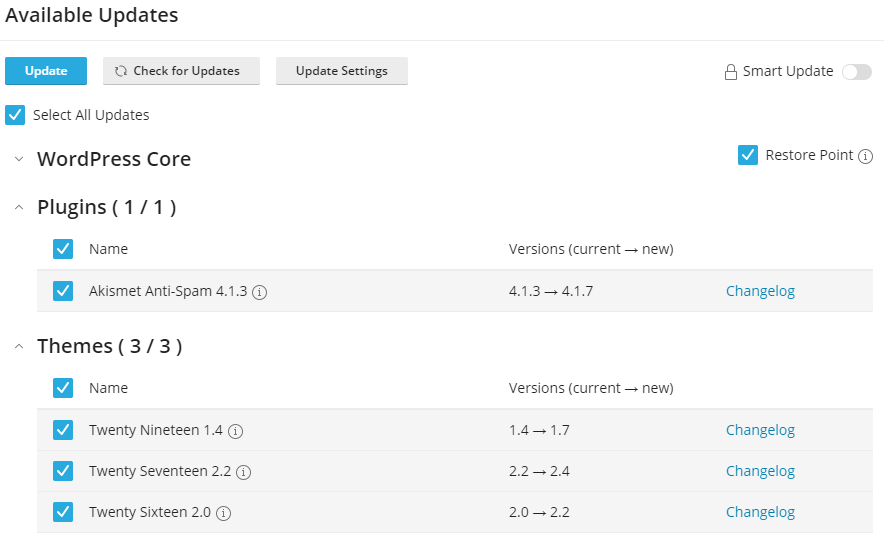
9. Click Update
The selected updates will be applied
Note: If you can't find an answer to your problem click Here to open a support ticket (requires log in).